Title here
Summary here


Depreciation spreads the cost of your assets over their useful life. MyFin works out each asset’s depreciation every month and posts it as a journal entry: the category’s depreciation expense account is debited and its accumulated depreciation account is credited.
You choose when to post it, usually once a month or before you run your reports.
Go to Company → Asset Management and click on “Asset Depreciation” in the side menu:
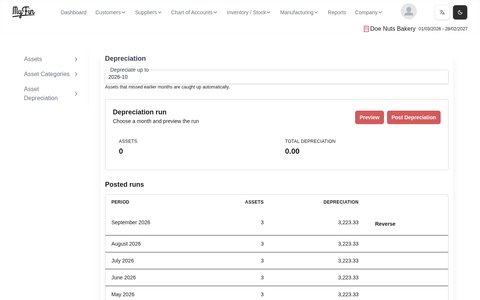
Choose the month to Depreciate up to and click “Preview”.
The preview shows each asset, the number of months charged, the depreciation, and the book value before and after. Assets that missed earlier months are caught up automatically.
Check the preview and click “Post Depreciation”. If you change the month, click “Regenerate” to update the preview.
Assets that are not in service yet, fully depreciated or disposed of are left out. If every asset is already depreciated up to the month you chose, there is nothing to post.
Posted runs are listed under “Posted runs”. Click on “Reverse” next to a run to delete its journal entries, for example after correcting an asset’s details. You can then post it again.