Title here
Summary here


When you save a document, such as an invoice, receipt or supplier payment, MyFin creates its journal entries for you. The default accounts tell it which accounts to use.
They are set when you create your company: the Business chart of accounts template sets them all for you. You only need to change them if you use your own accounts.
Many forms, such as the invoice form, let you choose a different account for one document. The default account is filled in for you.
Go to Company → Settings and click on “Default Accounts” in the side menu:
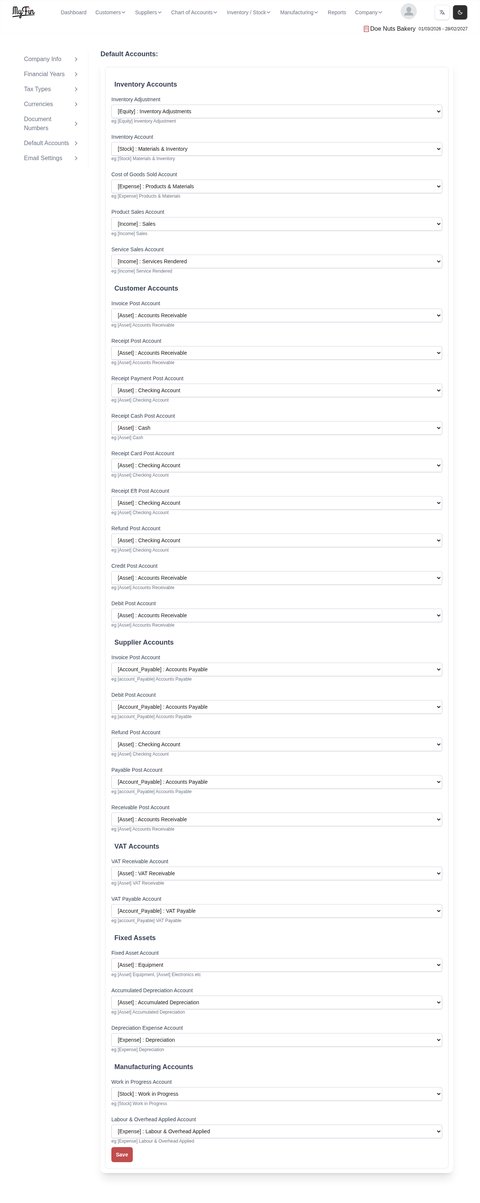
Choose an account for each setting. The hint under each one shows the kind of account to use.
Click on the “Save” button.
| Account | Used for | Example |
|---|---|---|
| Inventory Adjustment | Stock corrections, such as opening stock and write-offs. | [Equity] Inventory Adjustment |
| Inventory Account | The value of your stock. | [Stock] Materials Inventory |
| Cost of Goods Sold Account | The cost of the stock you sell. | [Expense] Products |
| Product Sales Account | Sales of products. | [Income] Sales |
| Service Sales Account | Sales of services. | [Income] Service Rendered |
| Customers: Invoice, Receipt, Credit and Debit Post Accounts | What customers owe you. | [Asset] Accounts Receivable |
| Receipt Payment / Cash / Card / EFT Post Accounts | Where money you receive goes, for each way of paying. | [Asset] Checking Account, [Asset] Cash |
| Refund Post Account | Where refunds are paid from. | [Asset] Checking Account |
| Suppliers: Invoice, Debit and Payable Post Accounts | What you owe your suppliers. | [account_Payable] Accounts Payable |
| VAT Receivable Account | VAT you can claim back on purchases. | [Asset] VAT Receivable |
| VAT Payable Account | VAT you owe on sales. | [account_Payable] VAT Payable |
| Fixed Asset, Accumulated Depreciation and Depreciation Expense Accounts | Your fixed assets and their depreciation. Each asset category has its own accounts too. | [Asset] Equipment |
| Work in Progress Account | The cost of production orders that are being made. | [Stock] Work in Progress |
| Labour & Overhead Applied Account | Labour and overhead added to production orders. | [Expense] Labour & Overhead Applied |