Company Information

What It Is?

When you set up your business or individual company, it’s crucial to have a clear and consistent company that represents you or your company.
This company includes all the key details that define your brand and how you interact with customers and suppliers. Here’s what you typically need to include:

  1. Business Name: The official name of your business that will appear on all documents and communications.
  2. Logo: A visual symbol that represents your company, which helps in creating a recognizable brand identity.
  3. Contact Details: This includes your phone number, email address, physical address, and any other relevant contact information. These details are essential for clients to reach you or your business.
  4. Registration Number: If applicable, your business’s registration or tax identification number, which is used for legal and financial purposes.
  5. Bank Details: The account numbers and bank names where payments should be made.

These details are then used across all your official documentation, such as:

  • Quotes: When you provide an estimate for a product or service.
  • Invoices: After delivering the goods or services, this is what you send to customers detailing what they owe.
  • Business Reports: These are used internally or for stakeholders to understand the financial and operational status of your business.
  • Stationery: Includes letterheads, business cards, envelopes, and any other materials that carry your brand identity and are used in communication with clients.

Having all this information filled out accurately and consistently ensures that your business presents a professional image, and it also helps in streamlining administrative tasks like invoicing and reporting.
It’s a foundational step in establishing a solid business presence and making sure that all your interactions are clear, professional, and on-brand.

How To Edit The Company Information?

  1. Goto the Settings page which is under the “Company” menu:
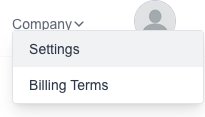
    company information menu
    company information menu

  2. You should see the “Company Information” page, if not click on the “Company Information” menu on the left.
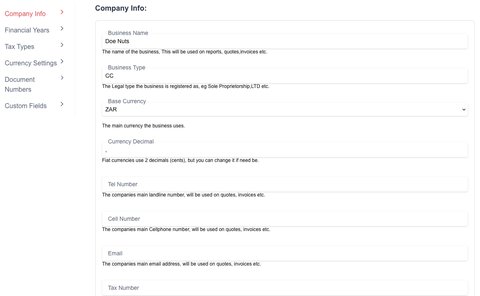
    company information form
    company information form

3.Simply change the values to your needs and then click on the “Save” button at the bottom of the page to save them.