Title here
Summary here


The Chart of Accounts (COA) is a structured list of all the accounts used by a business to record its financial transactions.
These accounts are grouped into categories such as assets, liabilities, income, expenses, and equity.
Each account in the COA represents a specific type of transaction, like sales revenue, office supplies,
or bank balances, and is usually assigned a unique code or number for easy identification.
Foundation of Your Financial System
The COA forms the backbone of your entire accounting setup. Every transaction, whether it’s a sale, an expense, or an asset purchase, must be recorded in the correct account to ensure accurate reporting.
Organized Record Keeping
It provides a clear and consistent structure for organizing financial data, making it easier to track where money is coming from, and where it’s going.
Accurate Financial Reporting
A well-structured COA ensures that reports like income statements, balance sheets, and cash flow statements are accurate and meaningful.
Customizable to Your Business
The COA can be tailored to match your industry or business type, allowing you to track performance in the way that makes the most sense for you.
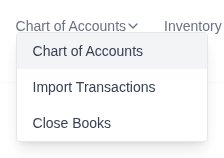
Go to Chart of Accounts → Chart of Accounts:
You will see your main accounts (Assets, Liability, Equity, Income, Expenses and Costs of Goods Sold) with their totals.
Click on the arrow next to an account, or on “Expand All”, to see the accounts under it. The totals at the bottom show your Net Assets and Net Profit/Loss.
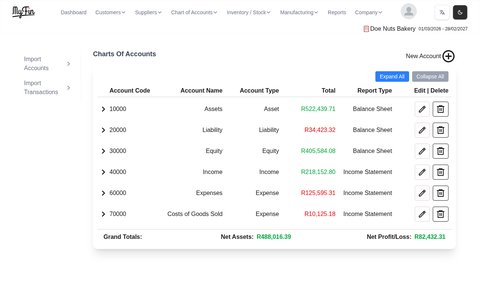
Click on an account (not a main account) to open its Account Entries.
The side menu has:
On the Chart of Accounts page, click on the “New Account” button.
The new account form will appear for you to fill in:
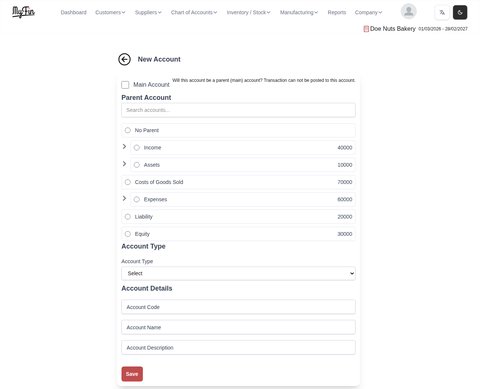
Click on the “Save” button to save the new account.
On the Chart of Accounts page, click on the “Edit” (pencil icon) next to the account:

Make your changes and click on the “Save” button.
Click on the “Delete” (trash icon) next to the account:

Click on the “Confirm” button to confirm and delete the account.