Title here
Summary here


The asset register lists every fixed asset with its cost, accumulated depreciation and book value (what it is still worth in your books).
The totals at the top show the value of all the assets you hold.
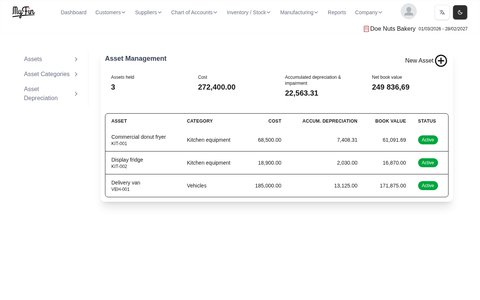
Go to Company → Asset Management and click on the “New Asset” button.
Fill in the form:
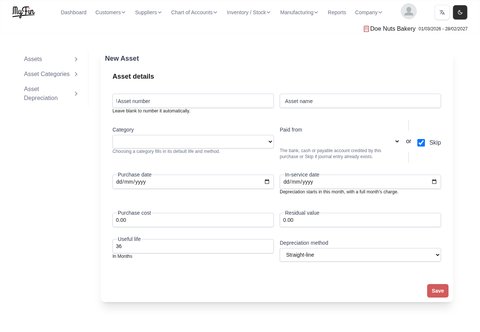
| Field | What it means |
|---|---|
| Asset number | Leave blank to number it automatically (FA-000001, FA-000002, …). |
| Asset name | eg Delivery van. |
| Category | Choosing a category fills in its default useful life and method. |
| Purchase date and Purchase cost | When you bought it and what it cost. |
| In-service date | When you started using it. Depreciation starts in this month, with a full month’s charge. |
| Residual value | What you expect it to be worth at the end of its life. It is not depreciated. |
| Depreciation method and Useful life | Taken from the category, but you can change them for this asset. |
| Paid from | The bank, cash or payable account the purchase was paid from, so MyFin can post the purchase for you. Skip is ticked by default: leave it ticked if the purchase is already in your books, for example through a supplier invoice or a bank import. |
Click on the “Save” button.
Click on an asset to see its cost, depreciation, impairment and book value, and every transaction posted for it: the acquisition, depreciation, impairments and disposal, each with its journal entry.
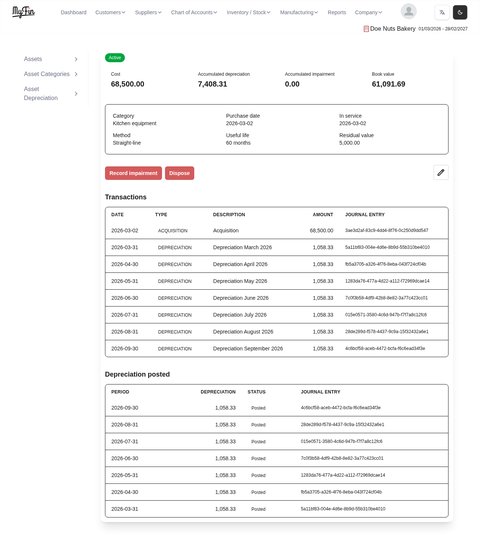
From this page you can record an impairment, dispose of the asset, or edit it with the “Edit” (pencil icon) button.
Once depreciation or other movements have been posted, only the name and asset number can be changed.
An impairment is a sudden loss of value, for example when an asset is damaged.
When you sell, scrap or write off an asset:
An asset that was added by mistake can be deleted with the “Delete” (trash icon) button on its page, as long as nothing else has been posted for it yet. Deleting it also deletes its acquisition journal entry.
Use Dispose for assets you no longer have.