Close Books
What It Is?
At the end of each financial year you close the books. This resets the balances of your income and expense accounts to zero and moves the year’s profit or loss into your owners’ equity, such as a Retained Earnings account.
No transactions are moved: MyFin creates closing journal entries that do this. It also:
- closes each owner’s drawings into their capital account, and
- creates Opening Balance entries for the balance sheet accounts (assets, liabilities and equity), dated the first day of the new year.
To work in the new year, add it under Financial Years.
Once the books are closed, nothing more can be posted to that year.
Before You Close The Books
- Capture everything for the year: invoices, receipts, supplier invoices and payments, bank imports and depreciation.
- Check your reports, especially the Income Statement and Balance Sheet.
- Make a backup of your company. See Backup and Restore.
How To Close The Books?
-
Go to Chart of Accounts → Close Books:
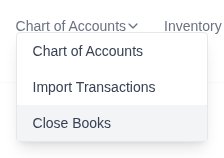
Chart of Accounts menu -
The page shows the financial year you are closing.
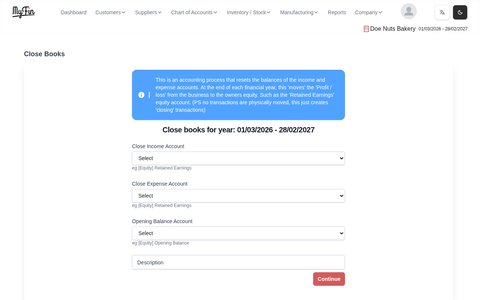
Close books -
Choose the:
- Close Income Account: the equity account the income is closed into, eg [Equity] Retained Earnings.
- Close Expense Account: the equity account the expenses are closed into, usually the same account.
- Opening Balance Account: the equity account used for the opening balances, eg [Equity] Opening Balance.
- Description (optional) for the closing entries.
-
Click on “Continue”.
How To Reopen The Books?
If you need to make a change to a closed year, go to Chart of Accounts → Close Books again. When the year’s books are already closed, the page lets you Reopen Books for that year. The closing and opening balance entries are removed so you can make your changes, and you can then close the books again.