Title here
Summary here


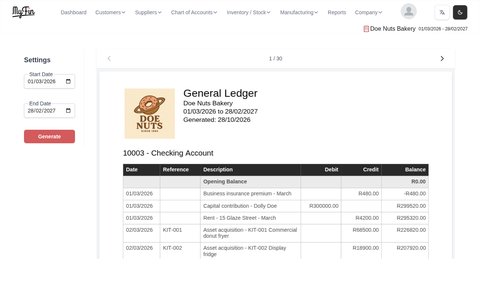
Every entry, account by account. Find them under Reports → Ledgers and accounts. They are all PDF reports: choose the settings on the left and click on “Generate”.
Every transaction in every account for the period, with each account’s opening balance and running balance.
Settings: the start and end date, and Account to show only one account (All Accounts to start with).
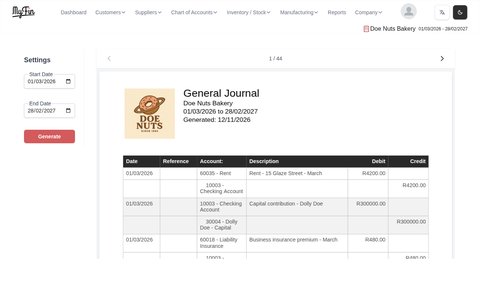
Every journal entry for the period in date order, with its debit and credit lines. Use it to follow the entries in the order they happened.
Settings: the start and end date.
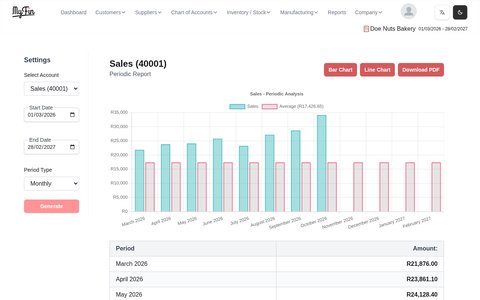
One account’s totals period by period, for example the Sales account month by month.
Settings: the account, the start and end date, and the period type (eg Monthly).
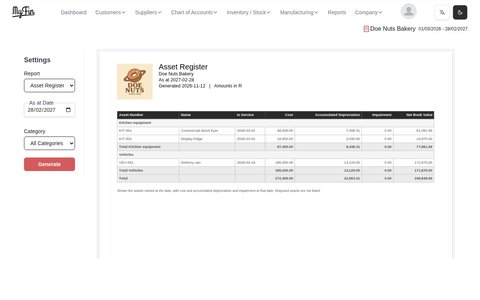
Reports on your fixed assets. Choose one under Report:
| Report | What it shows | Settings |
|---|---|---|
| Asset Register | The assets owned on a date, with their cost, accumulated depreciation and impairment, and net book value. Disposed assets are not listed. | As at Date, Category |
| Asset Movement Schedule | For each category: the opening balances, additions, disposals, depreciation and closing balances for the period. It says whether the closing balances agree with the register. | Start and end date, Category |
| Additions and Disposals | Assets bought and sold in the period, with the proceeds and the gain or loss on each disposal. | Start and end date, Category |
| Depreciation Expense by Month | Depreciation posted in each month, for up to 12 months. | Start and end date, Category |
| Depreciation Forecast | The depreciation expected in the coming months, from today’s balances. Overdue is depreciation for earlier months that hasn’t been posted yet. | Months Ahead, Category |
| Ledger Reconciliation | The asset and accumulated depreciation accounts in the books against the asset register, with any difference. Use the same dates as the balance sheet. | Financial Year Start, As at Date, Accounts to Include |
| Asset Exceptions | Assets that need attention: depreciation that is behind schedule, fully depreciated assets still in use, and depreciation postings removed from the ledger. |
For the Ledger Reconciliation, the accounts your asset categories post to are always included. Click on Accounts to Include to add other accounts. Tick a group account to include everything under it. MyFin remembers your choice on this device.
See Asset Management for adding assets and posting depreciation.